NinjaWeb · internal editorial system
Content Pilot
An internal editorial system connecting ideas, AI-assisted drafting, images, SEO and WordPress review. Each article stays traceable from brief to an approved publishing decision.
Content Pilot
NinjaWeb / Editorial workflowApprove & schedule
Editorial approval precedes the calendar check
- Draft prepared
- Supporting fields prepared
- Checks reviewed
- 01Brief
- 02Draft
- 03WordPress
- 04Image
- 05Check
- 06Approve & schedule
SECTION 01 / The system
From a loose idea
to a reviewable article.
Content Pilot brings NinjaWeb’s WordPress plugin and local editorial tools into one working process. Ideas, AI-assisted drafts, images and delivery checks stay connected, with human review at the publishing handoff.
Originality before output
Check the idea against existing content and give the article a specific reader, angle and purpose.
A complete draft package
Bring the article, topic-specific image, categories, SEO fields and internal links into the same workflow.
A deliberate handoff
Make the draft inspectable, record editorial decisions and schedule only after explicit approval.
SECTION 02 / Follow an article
A clear next step.
At every stage.
Explore the same six stages shown in the preview, from the brief to approval and scheduling.
Start with a reason to write.
An approved topic becomes a brief with a target reader, useful angle, evidence requirements and a clear connection to the service being discussed.
- Reader & purpose
- Angle & proof required
- Originality check
Turn the brief into an article.
AI assists with drafting. The article is shaped around its argument and examples, then saved as a working package for further review.
- Article body & structure
- Examples & supporting details
- Saved local package
Prepare the WordPress draft.
Save the article as a WordPress draft, with categories, the primary category, Yoast fields and relevant internal links. The featured image follows in the next stage.
- Draft post & metadata
- Categories & Yoast fields
- Internal links
Give the topic its own image.
A topic-specific image follows the visual brief. It is reviewed, compressed and attached to the WordPress draft with the supporting image fields.
- Visual review
- Compressed image & alt text
- Featured attachment
Inspect before handing over.
Delivery checks verify the post fields and image attachment. A passing package can be marked ready for review; an open issue goes back for correction.
- Required fields inspected
- Image attachment verified
- Ready for editorial review
Keep the final decision visible.
The editor reviews the draft and any notes. Approval is recorded separately, then the calendar is checked before the approved item is scheduled.
- Resolve review notes
- Record explicit approval
- Check calendar & schedule
Explore each stage. This is an illustrative workflow using sample content.
SECTION 03 / The article package
More than
the article body.
The draft needs its supporting details: a relevant image, useful metadata, the right category and links. The delivery checks bring those details into the review process.
The draft and its supporting details.
Illustrative workflow using sample content
A clearer brief.
A stronger article.
Define the reader and purpose.A defined reader, useful evidence and a clear connection to the topic.
Draft saved for editorial reviewThe supporting package
- Content & originality
- Reader, angle, evidence and internal links.
- Topic-specific image
- Visual review, compression and alt text.
- WordPress & SEO
- Category, primary category and Yoast fields.
- Delivery checks
- Post fields and featured attachment verified.
Ready for review
Sample content showing the relationship between article preparation and delivery checks.
SECTION 04 / Review and scheduling
Ready for review
is a handoff.
Editorial notes can send an article back for changes. A reviewed draft needs a recorded approval before the separate scheduling step, with the calendar checked for a suitable slot.
A finished draft still needs a decision.
Illustrative workflow using sample states
Changes requested
Notes return to the article.
A specific edit is still open.
Return to draftReady for review
The full package is available to inspect.
Content, image and SEO together.
Awaiting editorApproved for schedule
Approval is recorded separately.
Check the calendar before scheduling.
Explicit approval recordedUnresolved editorial notes return the article for changes.
Changes requested, ready for review and approved for schedule. These are sample states.
SECTION 05 / The review workspace
The editorial queue.
The actual interface.
Schedule Review brings the article, destination, category, publishing time, delivery gate and editorial notes into one view. Status filters separate pending work from scheduled and published records.
Captured from the existing local Schedule Review interface. The visible counts and statuses belong to the saved queue shown.
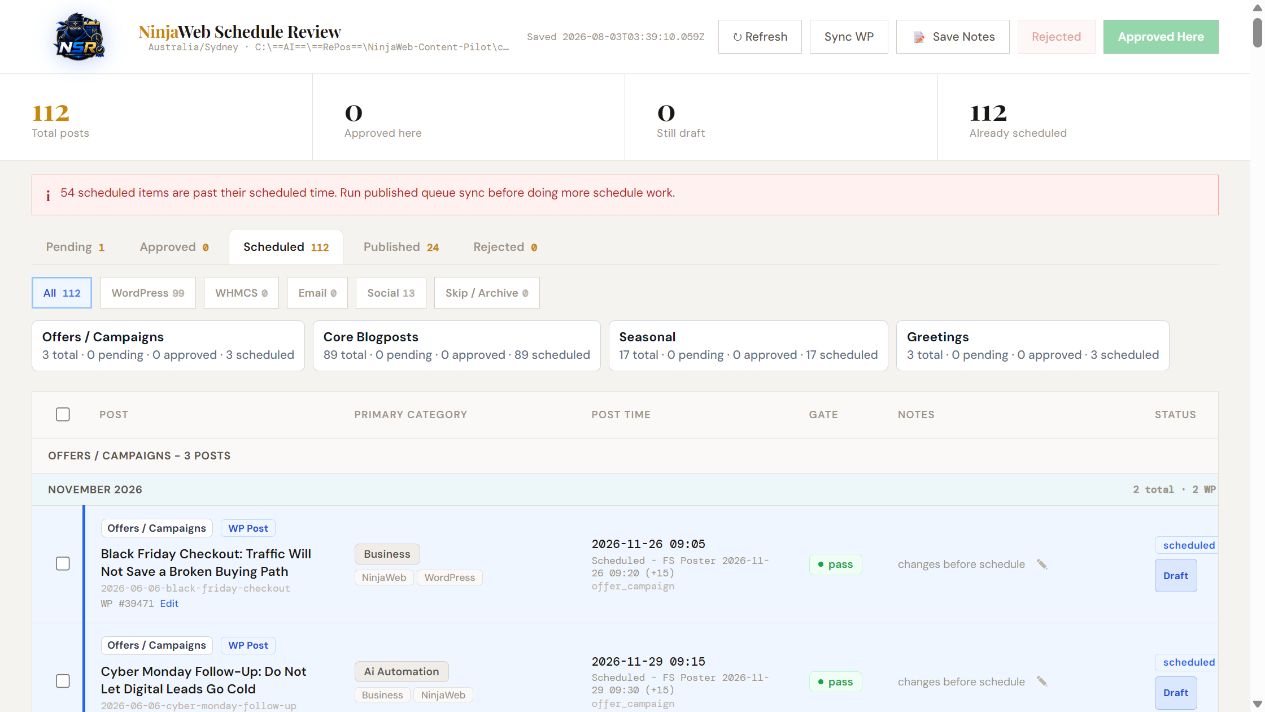
Publishing times, categories, delivery gates and editorial notes remain visible alongside each scheduled item.
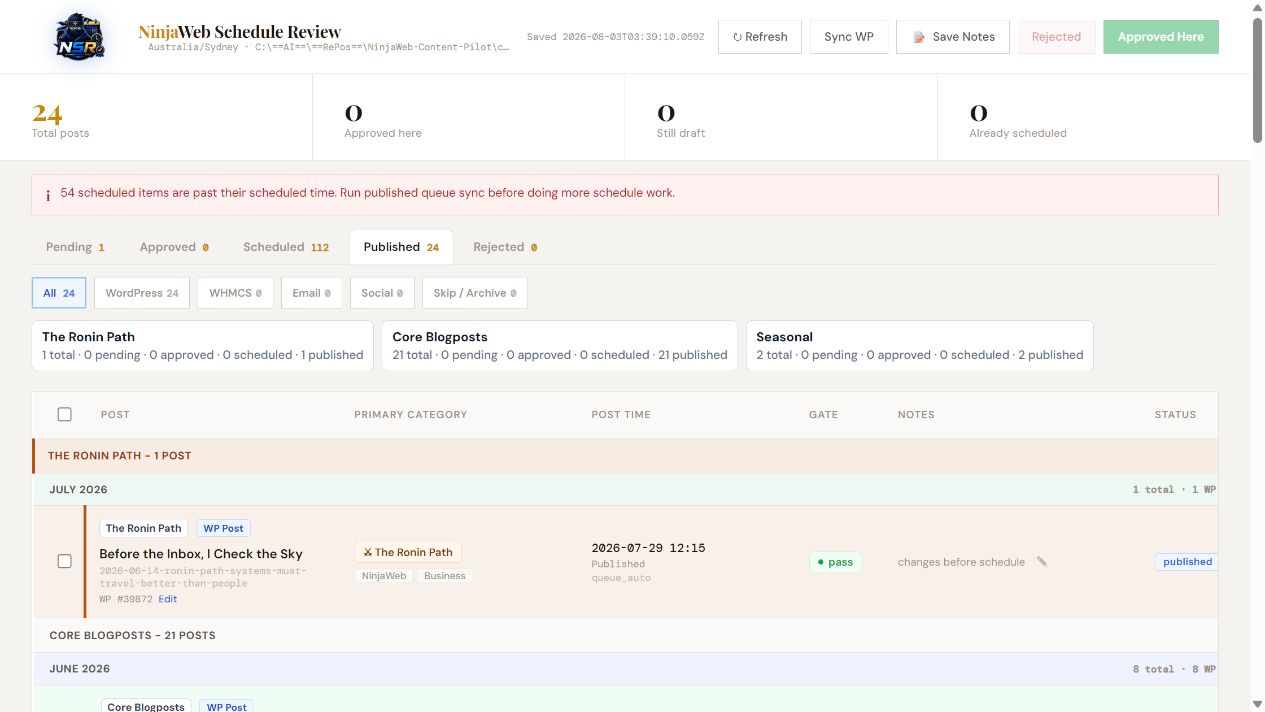
Published records retain their article title, category, posting time and review context.
Assisted production.
Editorial control.
Content Pilot is internal NinjaWeb tooling, built around the way the editorial work is done. AI helps prepare the work; the package, checks and review process keep the publishing decision deliberate.